Agent Skills Workflow: From Beginner to Practice
Preface
In today’s rapidly advancing field of artificial intelligence, Agent technology is transforming the way we build applications. As a bridge connecting agents with specific capabilities, the Agent Skills workflow provides developers with a flexible and scalable architectural pattern. This article will start from basic concepts, combine real-world cases, and guide you in gaining an in-depth understanding of the design and implementation of Agent Skills.
1. What Is Agent Skills
1.1 Core Concepts
Agent: An entity with autonomous decision-making ability, capable of understanding tasks, planning actions, and executing operations.
Skill: A concrete capability unit that an Agent can invoke, such as file reading, data querying, text analysis, etc.
Agent Skills Workflow: The process by which an Agent identifies task requirements, dynamically selects and invokes appropriate Skills, and ultimately fulfills the user’s goal.
1.2 Architecture Design
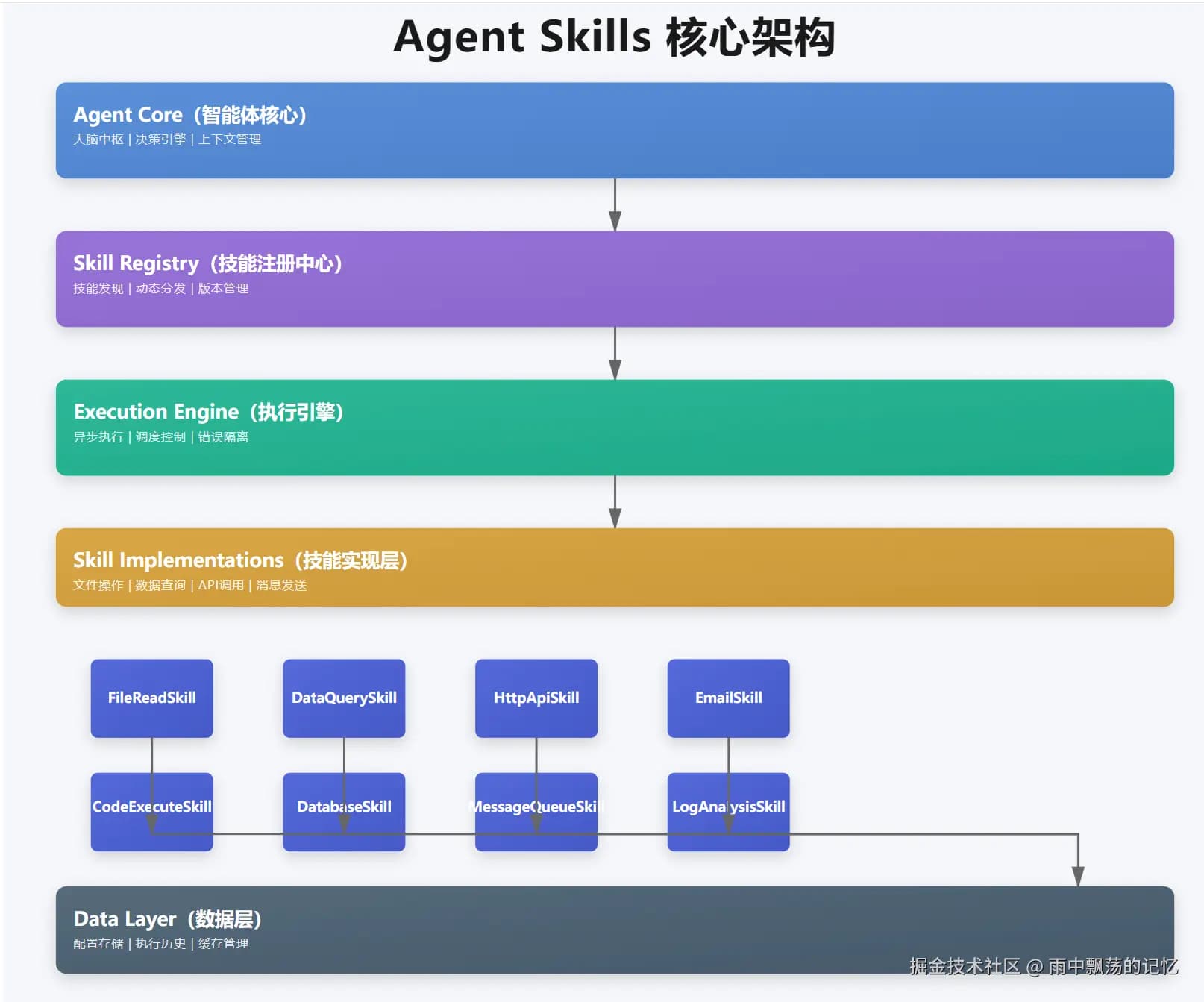
The Agent Skills architecture consists of four core layers:
- Agent Core: The central part of the agent, responsible for decision-making and coordination
- Skill Registry: The skill registration center, managing all available skills
- Execution Engine: The execution engine, handling skill invocation and error retries
- Skill Implementations: The layer of concrete skill implementations
This layered design ensures system scalability and maintainability.
2. Implementation of Core Components
2.1 Agent Interface Design
package com.example.agent;
import com.example.skills.Skill;
import com.example.skills.SkillResult;
import java.util.Map;
/**
* Agent interface
* Defines the basic behavior and capabilities of an Agent
* 1.0.0
*/
public interface Agent {
String getName();
String getDescription();
/**
* Execute a task
*
* task Task content
* context Execution context
* Execution result
*/
AgentResult execute(String task, AgentContext context);
/**
* Register a skill
*
* skill Skill instance
*/
void registerSkill(Skill skill);
java.util.Collection<Skill> getSkills();
class AgentResult {
private final boolean success;
private final String message;
private final Object data;
private final long executionTime;
public AgentResult(boolean success, String message, Object data, long executionTime) {
this.success = success;
this.message = message;
this.data = data;
this.executionTime = executionTime;
}
public static AgentResult success(String message, Object data) {
return new AgentResult(true, message, data, 0);
}
public static AgentResult success(String message, Object data, long executionTime) {
return new AgentResult(true, message, data, executionTime);
}
public static AgentResult failure(String message) {
return new AgentResult(false, message, null, 0);
}
public boolean isSuccess() {
return success;
}
public String getMessage() {
return message;
}
public Object getData() {
return data;
}
public long getExecutionTime() {
return executionTime;
}
@Override
public String toString() {
return "AgentResult{" +
"success=" + success +
", message='" + message + '\'' +
", data=" + data +
", executionTime=" + executionTime + "ms" +
'}';
}
}
}
The Agent interface defines the basic behavior of an intelligent agent, with the most critical method being execute, which receives a task and context and returns the execution result.
2.2 Skill Interface Design
package com.example.skills;
import java.util.Map;
/**
* Skill interface
* Defines specific skills that an Agent can execute
* 1.0.0
*/
public interface Skill {
String getName();
String getDescription();
default String getVersion() {
return "1.0.0";
}
/**
* Determine whether the skill can execute the given task
*
* task Task content
* Whether it can be executed
*/
boolean canExecute(String task);
/**
* Execute the skill
*
* task Task content
* parameters Parameters
* Execution result
*/
SkillResult execute(String task, Map<String, Object> parameters);
default long getTimeout() {
return 30000;
}
/**
* Validation before skill execution
*
* task Task content
* parameters Parameters
* Whether validation passes
*/
default boolean validate(String task, Map<String, Object> parameters) {
return task != null && !task.trim().isEmpty();
}
default void cleanup() {
}
}
The Skill interface uses the strategy pattern; each skill implementation handles independent functionality and declares which tasks it can handle via the canExecute method.
2.3 Skill Invocation Process
The complete skill invocation process includes 10 steps:
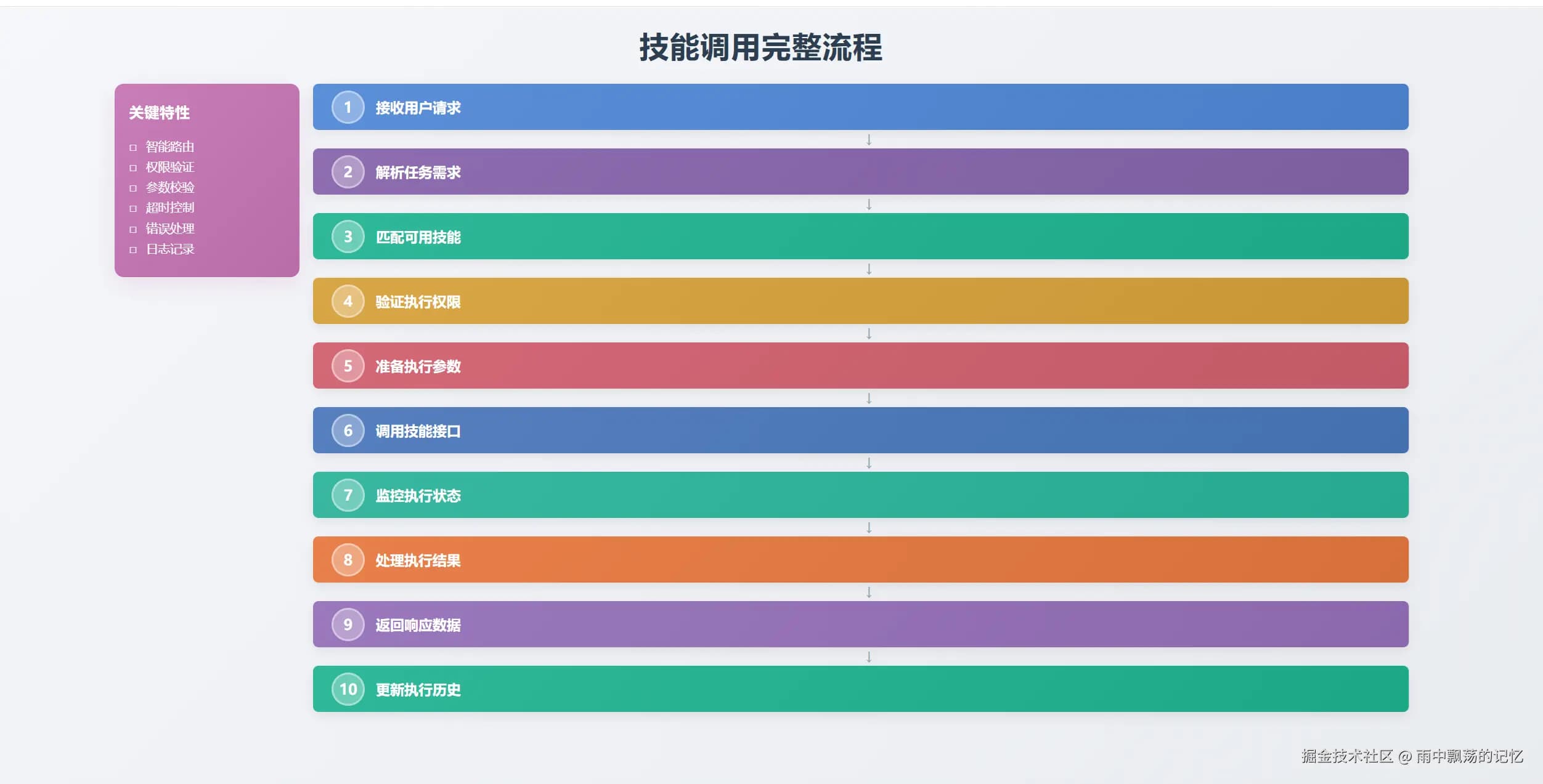 1. Receive user request
2. Parse task intent
3. Match available skills
4. Validate execution permissions
5. Prepare execution parameters
6. Call skill interface
7. Monitor execution status
8. Handle execution result
9. Return response data
10. Update execution history
Each step has its specific responsibility, ensuring safe and efficient task execution.
3. Basic Skill Implementations
3.1 File Read Skill
package com.example.skills.impl;
import com.example.skills.Skill;
import com.example.skills.SkillResult;
import org.slf4j.Logger;
import org.slf4j.LoggerFactory;
import java.io.IOException;
import java.nio.charset.StandardCharsets;
import java.nio.file.Files;
import java.nio.file.Path;
import java.nio.file.Paths;
import java.util.ArrayList;
import java.util.List;
import java.util.Map;
/**
* File Read Skill
* Used to read local file contents
* 1.0.0
*/
public class FileReadSkill implements Skill {
private static final Logger logger = LoggerFactory.getLogger(FileReadSkill.class);
@Override
public String getName() {
return "FileReadSkill";
}
@Override
public String getDescription() {
return "Read local file contents, supports text files, config files, etc.";
}
@Override
public boolean canExecute(String task) {
if (task == null) {
return false;
}
String lowerTask = task.toLowerCase();
return lowerTask.contains("file") &&
(lowerTask.contains("read") || lowerTask.contains("open") || lowerTask.contains("view"));
}
@Override
public boolean validate(String task, Map<String, Object> parameters) {
if (!Skill.super.validate(task, parameters)) {
return false;
}
Object filePath = parameters.get("filePath");
if (filePath == null) {
logger.warn("filePath parameter is missing");
return false;
}
Path path = Paths.get(filePath.toString());
if (!Files.exists(path)) {
logger.warn("File does not exist: {}", filePath);
return false;
}
if (!Files.isReadable(path)) {
logger.warn("File is not readable: {}", filePath);
return false;
}
return true;
}
@Override
public SkillResult execute(String task, Map<String, Object> parameters) {
long startTime = System.currentTimeMillis();
try {
String filePath = parameters.get("filePath").toString();
logger.info("Reading file: {}", filePath);
Path path = Paths.get(filePath);
String content = new String(Files.readAllBytes(path), StandardCharsets.UTF_8);
long fileSize = Files.size(path);
String fileName = path.getFileName().toString();
Map<String, Object> metadata = new java.util.HashMap<>();
metadata.put("filePath", filePath);
metadata.put("fileName", fileName);
metadata.put("fileSize", fileSize);
metadata.put("lines", content.split("\n").length);
long executionTime = System.currentTimeMillis() - startTime;
logger.info("File read successfully: {} ({} bytes)", fileName, fileSize);
return SkillResult.success(
"File read successfully: " + fileName,
content,
executionTime,
metadata
);
} catch (IOException e) {
logger.error("Error reading file", e);
return SkillResult.failure("File read failed: " + e.getMessage(), e.getMessage());
}
}
@Override
public long getTimeout() {
return 10000;
}
public List<String> readLines(String filePath) throws IOException {
Path path = Paths.get(filePath);
return Files.readAllLines(path, StandardCharsets.UTF_8);
}
public boolean exists(String filePath) {
return Files.exists(Paths.get(filePath));
}
public long getFileSize(String filePath) throws IOException {
return Files.size(Paths.get(filePath));
}
}
3.2 Data Query Skill
public class DataQuerySkill implements Skill {
private final Map<String, List<Map<String, Object>>> database;
public DataQuerySkill() {
this.database = new ConcurrentHashMap<>();
initializeSampleData();
}
@Override
public boolean canExecute(String task) {
String lowerTask = task.toLowerCase();
return lowerTask.contains("query") ||
lowerTask.contains("data");
}
@Override
public SkillResult execute(String task, Map<String, Object> parameters) {
String tableName = parameters.get("tableName").toString();
String condition = parameters.get("condition").toString();
List<Map<String, Object>> results = performQuery(
tableName, condition, 100
);
return SkillResult.success(
"Query successful, found " + results.size() + " records",
results
);
}
}
3.3 Text Analysis Skill
public class TextAnalysisSkill implements Skill {
@Override
public SkillResult execute(String task, Map<String, Object> parameters) {
String text = parameters.get("text").toString();
String operation = parameters.get("operation").toString();
switch (operation) {
case "stats":
return analyzeStats(text);
case "keywords":
return extractKeywords(text);
case "sentiment":
return analyzeSentiment(text);
default:
return fullAnalysis(text);
}
}
}
4. Agent Interaction Mechanism
4.1 Sequential Interaction
Interaction between Agent and Skills follows a clear sequence:
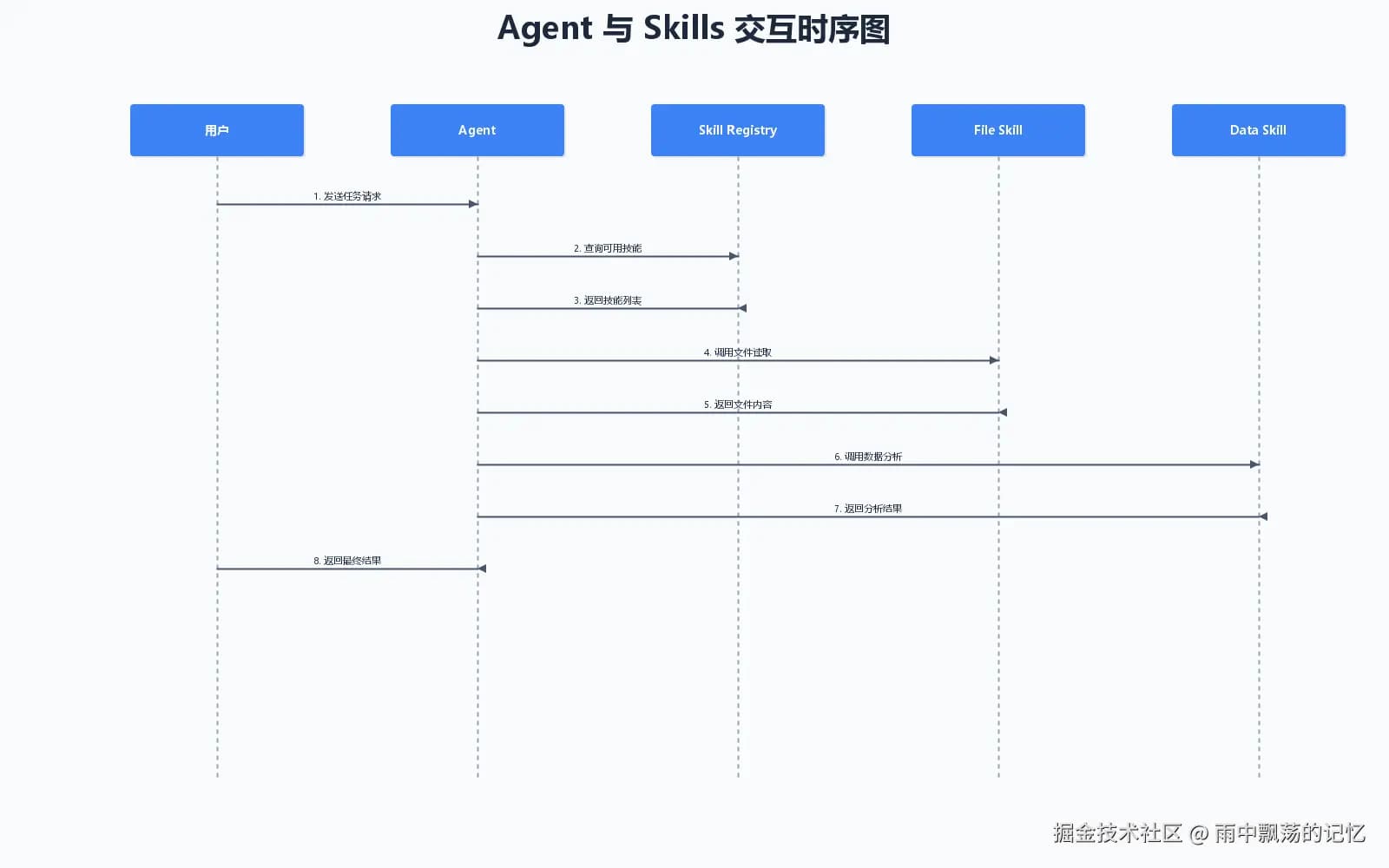 1. User sends task request to Agent
2. Agent queries Skill Registry for available skills
3. Registry returns matching skill list
4. Agent calls specific skill to execute task
5. Skill returns execution result
6. Agent consolidates result and returns to user
4.2 Context Management
AgentContext passes and stores data during execution:
package com.example.agent;
import java.util.HashMap;
import java.util.Map;
import java.util.concurrent.ConcurrentHashMap;
/**
* Agent execution context
* Used to pass and store data during Agent execution
* 1.0.0
*/
public class AgentContext {
private final String requestId;
private final Map<String, Object> attributes;
private final Map<String, Object> sessionData;
private final long createdAt;
public AgentContext(String requestId) {
this.requestId = requestId;
this.attributes = new ConcurrentHashMap<>();
this.sessionData = new ConcurrentHashMap<>();
this.createdAt = System.currentTimeMillis();
}
public String getRequestId() {
return requestId;
}
public void setAttribute(String key, Object value) {
attributes.put(key, value);
}
public void setAttributes(Map<String, Object> attributes) {
if (attributes != null) {
this.attributes.putAll(attributes);
}
}
public Object getAttribute(String key) {
return attributes.get(key);
}
@SuppressWarnings("unchecked")
public <T> T getAttribute(String key, Class<T> type) {
Object value = attributes.get(key);
if (value != null && type.isInstance(value)) {
return (T) value;
}
return null;
}
public Object removeAttribute(String key) {
return attributes.remove(key);
}
public void setSessionData(String key, Object value) {
sessionData.put(key, value);
}
public Object getSessionData(String key) {
return sessionData.get(key);
}
public Map<String, Object> getAllAttributes() {
return new HashMap<>(attributes);
}
public void clear() {
attributes.clear();
}
public long getCreatedAt() {
return createdAt;
}
public long getAge() {
return System.currentTimeMillis() - createdAt;
}
public static AgentContext create() {
return create(generateRequestId());
}
public static AgentContext create(String requestId) {
return new AgentContext(requestId);
}
private static String generateRequestId() {
return "req-" + System.currentTimeMillis() + "-" + Thread.currentThread().getId();
}
@Override
public String toString() {
return "AgentContext{" +
"requestId='" + requestId + '\'' +
", attributes=" + attributes.size() +
", sessionData=" + sessionData.size() +
", age=" + getAge() + "ms" +
'}';
}
}
Context is divided into temporary attributes and session data; temporary attributes are valid within a single request, while session data can be shared across requests.
5. Multi-Agent Collaboration
5.1 Collaboration Architecture
In complex systems, multiple Agents working together can accomplish more sophisticated tasks:
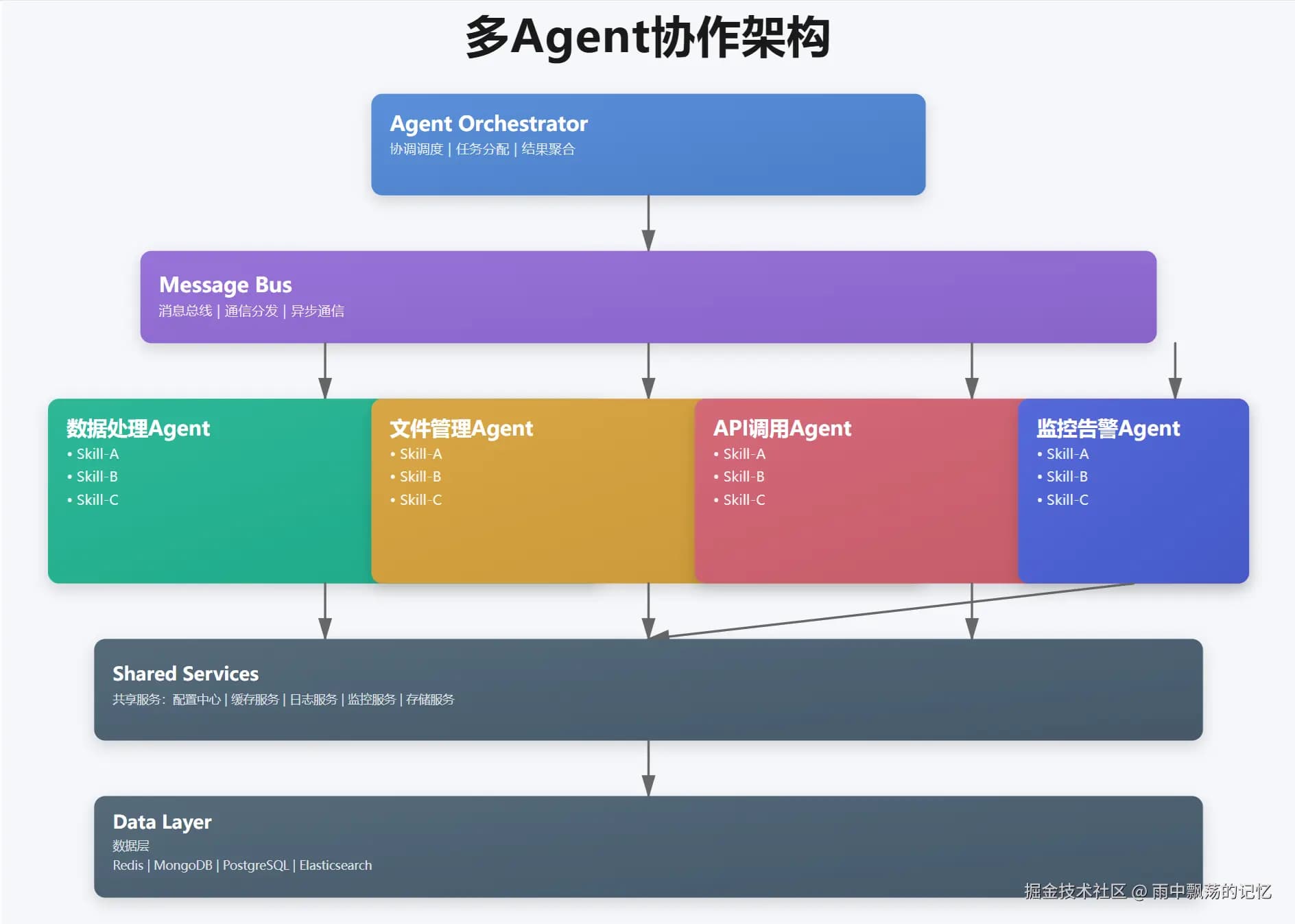 - Agent Orchestrator: Coordinates overall system operation
- Message Bus: Enables asynchronous communication between Agents
- Specialized Agents: Agents dedicated to specific domains
5.2 Message Passing
public class MessageBus {
private final Map<String, List<Agent>> subscribers;
public void publish(String topic, Message message) {
List<Agent> agents = subscribers.get(topic);
for (Agent agent : agents) {
executor.submit(() ->
agent.execute(message.getContent(), message.getContext())
);
}
}
}
6. Practical Case: Intelligent Data Analysis System
6.1 System Design
Taking an intelligent data analysis system as an example, we demonstrate the practical application of Agent Skills:
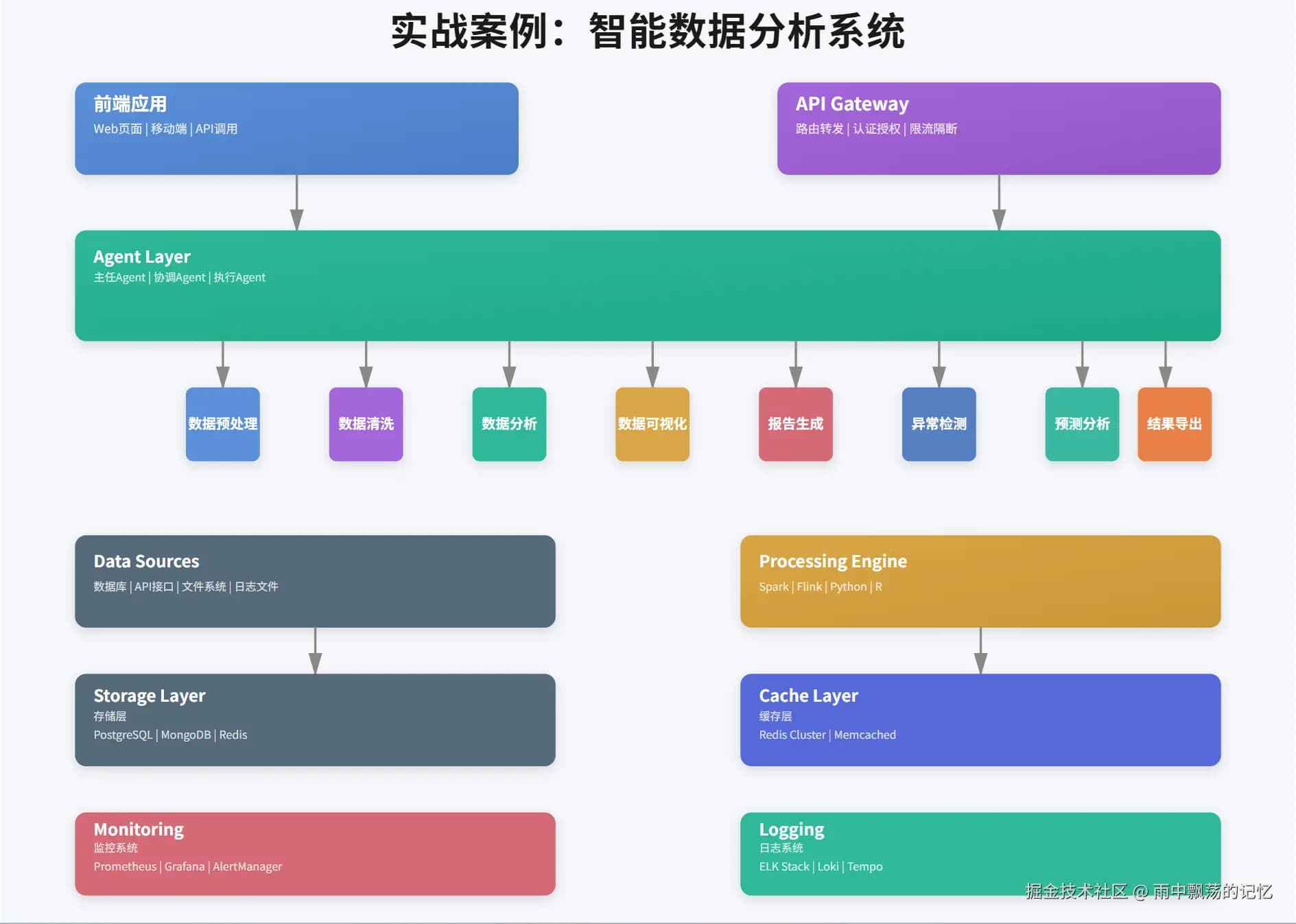 The system contains the following key components:
- Frontend Application: Web interface and mobile app
- API Gateway: Unified entry point, handles authentication and rate limiting
- Agent Layer: Multiple specialized data processing Agents
- Skills Layer: 8 core skills
- Data Sources: Support for various data sources
6.2 Data Analysis Agent Implementation
package com.example.demo;
import com.example.agent.Agent;
import com.example.agent.AgentContext;
import com.example.agent.BaseAgent;
import com.example.skills.SkillResult;
import com.example.skills.impl.DataQuerySkill;
import com.example.skills.impl.FileReadSkill;
import com.example.skills.impl.TextAnalysisSkill;
import org.slf4j.Logger;
import org.slf4j.LoggerFactory;
import java.util.HashMap;
import java.util.Map;
/**
* Data Analysis Agent
* Specifically handles data analysis related tasks
* 1.0.0
*/
public class DataAnalysisAgent extends BaseAgent {
private static final Logger logger = LoggerFactory.getLogger(DataAnalysisAgent.class);
public DataAnalysisAgent() {
super("DataAnalysisAgent", "Data analysis intelligent agent, providing data query, analysis, and visualization capabilities");
registerSkill(new DataQuerySkill());
registerSkill(new TextAnalysisSkill());
registerSkill(new FileReadSkill());
}
public Agent.AgentResult analyzeData(String query, AgentContext context) {
logger.info("[DataAnalysisAgent] Starting data analysis: {}", query);
Map<String, Object> parameters = new HashMap<>();
parameters.put("tableName", "users");
parameters.put("condition", query);
parameters.put("limit", 100);
context.setAttributes(parameters);
return execute("Query user data: " + query, context);
}
public Agent.AgentResult generateReport(String filePath, AgentContext context) {
logger.info("[DataAnalysisAgent] Generating report from file: {}", filePath);
Map<String, Object> parameters = new HashMap<>();
parameters.put("filePath", filePath);
context.setAttributes(parameters);
AgentResult fileResult = execute("Read data file", context);
if (fileResult.isSuccess()) {
String content = fileResult.getData().toString();
Map<String, Object> analysisParams = new HashMap<>();
analysisParams.put("text", content);
analysisParams.put("operation", "analyze");
context.setAttributes(analysisParams);
return execute("Analyze text content", context);
}
return fileResult;
}
@Override
protected void preprocess(String task, AgentContext context) {
super.preprocess(task, context);
context.setAttribute("agentType", "data-analysis");
context.setAttribute("timestamp", System.currentTimeMillis());
}
@Override
protected void postprocess(String task, SkillResult result, AgentContext context) {
super.postprocess(task, result, context);
if (result.isSuccess()) {
context.setSessionData("lastAnalysis", result.getData());
context.setSessionData("lastAnalysisTime", System.currentTimeMillis());
}
}
}
6.3 Usage Example
public class Demo {
public static void main(String[] args) {
DataAnalysisAgent agent = new DataAnalysisAgent();
AgentContext context = AgentContext.create();
AgentResult result = agent.analyzeData("Engineering Department", context);
if (result.isSuccess()) {
System.out.println("Query result: " + result.getData());
}
}
}
7. Production Environment Deployment
7.1 Deployment Architecture
Production environments must consider high availability, scalability, and monitoring:
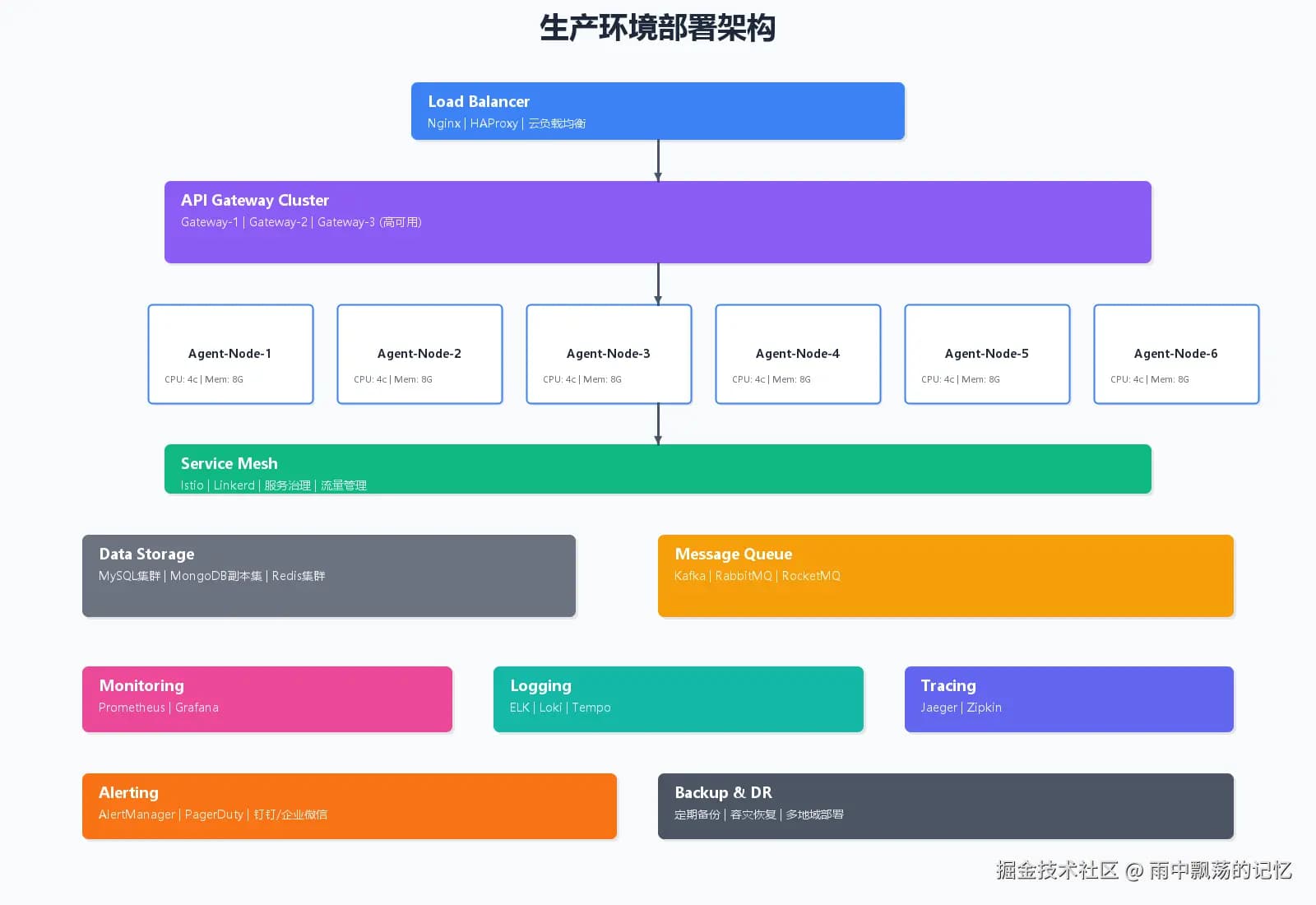 Key design points:
- Load Balancing: Use Nginx or cloud load balancer
- Multi-replica Deployment: Deploy multiple instances of each Agent
- Monitoring System: Prometheus + Grafana
- Log Collection: ELK Stack for unified log management
- Connection Pool Management: Reuse database and HTTP connections
- Asynchronous Execution: Use thread pools for parallel task processing
- Caching Strategy: Cache frequently used query results
- Timeout Control: Prevent excessively long skill execution
public class BaseAgent {
protected ExecutorService executorService;
protected SkillResult executeSkill(Skill skill, String task,
Map<String, Object> parameters) {
Future<SkillResult> future = executorService.submit(
() -> skill.execute(task, parameters)
);
return future.get(skill.getTimeout(), TimeUnit.MILLISECONDS);
}
}
7.3 Error Handling
Comprehensive error handling mechanism:
try {
SkillResult result = executeSkill(skill, task, parameters);
if (result.isSuccess()) {
return AgentResult.success(result.getMessage(), result.getData());
} else {
logger.error("Skill execution failed: {}", result.getError());
return executeFallbackSkill(task, context);
}
} catch (TimeoutException e) {
return AgentResult.failure("Execution timeout");
} catch (Exception e) {
return AgentResult.failure("Execution exception: " + e.getMessage());
}
8. Testing Strategy
8.1 Unit Tests
@DisplayName("TextAnalysisSkill Test")
class TextAnalysisSkillTest {
@Test
@DisplayName("Test sentiment analysis")
void testSentimentAnalysis() {
TextAnalysisSkill skill = new TextAnalysisSkill();
Map<String, Object> parameters = new HashMap<>();
parameters.put("text", "I'm feeling very good today!");
parameters.put("operation", "sentiment");
SkillResult result = skill.execute("Sentiment analysis", parameters);
assertTrue(result.isSuccess());
assertNotNull(result.getData());
}
}
8.2 Integration Tests
Testing collaboration between Agent and Skills:
@Test
@DisplayName("Test Agent full workflow")
void testAgentWorkflow() {
DataAnalysisAgent agent = new DataAnalysisAgent();
AgentContext context = AgentContext.create();
AgentResult result = agent.analyzeData("Engineering Department", context);
assertTrue(result.isSuccess());
assertNotNull(result.getData());
}
9. Best Practices
9.1 Skill Design Principles
- Single Responsibility: Each skill does one thing only
- Idempotence: Same input produces same output
- Timeout Control: Set reasonable execution timeout
- Resource Cleanup: Release resources after execution
9.2 Agent Design Principles
- Domain Focus: Each Agent focuses on a specific domain
- Observability: Record complete execution logs
- Fault Tolerance: Gracefully handle various exceptions
- Testability: Easy to write unit tests
10. Summary
The Agent Skills workflow provides an elegant architectural pattern that organically combines AI agents with traditional software development.
In the future, as AI technology advances, Agent Skills will play an important role in more fields.
This article is reprinted from: Agent Skills Workflow: From Beginner to Practice
 Aling
Aling