**[Ramblings] About Browser Rendering**
Stay thinking, stay learning.
 Aling
AlingWho wouldn’t want a front-end developer to deeply understand the browser — its past, the intricacies of how it interacts with us, and all the little details we encounter day in and day out...🙂↔️
#VSync
VSync, short for Vertical Synchronization, is a graphics technology that synchronizes the frame rate of games or applications with the refresh rate of the display to eliminate screen tearing. Screen tearing occurs when the GPU’s output frame rate does not match the monitor’s refresh rate, causing parts of multiple frames to be displayed simultaneously on screen, resulting in a horizontally split image. Its core principle is to wait for the monitor’s vertical blanking interval (VBlank) signal, aligning the GPU’s frame rendering output precisely with the monitor’s refresh rate, thereby eliminating screen tearing.
#Basic Concepts
- Refresh Rate: The number of times per second the display refreshes the screen; e.g., 60Hz means one refresh every 16.67ms.
- Frame Rate: The number of frames rendered by the GPU per second (FPS).
- VBlank (Vertical Blanking Interval): A brief “blank period” (about 1–2ms) after the display finishes scanning one frame (drawing line by line from top to bottom), used to reset the scan position. Frame data can be safely swapped during this time.
- Cause of Screen Tearing: Without VSync, the GPU submits a new frame midway through the display’s scan, causing the screen to show the upper part of the old frame and the lower part of the new frame simultaneously, forming a horizontal tear line.
#Monitor Refresh Principle
The principle of a monitor refreshing a frame (whether CRT, LCD, or OLED) is similar: line-by-line scanning.
- Starts from the top of the screen, drawing pixels line by line (Active Scan period, ~15ms).
- After finishing the bottom scan, enters the VBlank period (~1.67ms), where the electron beam/scanner returns to the top to prepare for the next frame.
- At the start of VBlank, the monitor sends a VSync signal to the GPU (via HDMI/DisplayPort, etc.).
- If FPS > Refresh Rate: The GPU renders too fast and idles waiting after VBlank (frame rate capped).
- If FPS < Refresh Rate: May skip frames (repeat old frame) or stutter (wait for accumulation).
#Relationship with the Browser
VSync is closely related to browsers, mainly reflected in the browser rendering pipeline: Browsers use the VSync signal to synchronize web page frame rendering with the monitor’s refresh rate (typically 60Hz, one frame every 16.67ms), ensuring smooth animation, scrolling, and video playback without tearing. This is similar to VSync in games, but browsers optimize for the compositor thread taking the lead, reducing jank caused by blocking of the main thread (JS/layout).
#VSync Signal Source
VSync is not generated by Chrome itself, but comes from the operating system or hardware:
PlatformVSync SourceAndroidSurfaceFlinger + HWC (Hardware Composer) generate via DispSync software PLLLinuxDRM/KMS subsystem (Direct Rendering Manager / Kernel Mode Setting) provides vblank eventsWindowsDirectX’s IDXGIOutput::WaitForVBlank() or DWM (Desktop Window Manager) composermacOSCore Video’s CVDisplayLink, synchronized with display refresh rateChromeOSBased on Linux DRM, accessed via the Ozone abstraction layer
#Capturing VSync: VSyncProvider
Chrome defines the VSyncProvider interface (//ui/compositor/vsync_provider.h), with platform-specific implementations:
- Android:
AndroidVSyncProvider- Registers
Choreographer.FrameCallback - Calls Java layer
Choreographer.postFrameCallbackvia JNI
- Registers
- Linux:
DrmVSyncProviderorWaylandVSyncProvider- Listens for DRM’s
DRM_EVENT_VBLANKor Wayland’sframeevent
- Listens for DRM’s
- macOS:
DisplayLinkMac- Uses
CVDisplayLinkSetOutputCallback
- Uses
When VSync arrives, these Providers call:
cpp
#Distributing VSync: Viz Display Compositor
This is the core of Chrome’s graphics stack — the Viz (Visuals) system, responsible for frame scheduling and composition.
#Key Components:
DisplayScheduler(//components/viz/service/display/display_scheduler.cc)- Receives
OnVSync - Triggers
BeginFrame - Manages frame pacing (throttling, skipping).
- Receives
BeginFrameSource- Converts VSync into
BeginFrameArgs(containing frame ID, timestamp, interval); - Broadcasts to all subscribers (e.g., renderer’s compositor thread).
- Converts VSync into
plaintext
#Use of VSync in the Renderer Process
#Compositor Thread
- Upon receiving
BeginFrame:- Updates compositor property animations (
transform,opacity) - Checks if main thread update is needed (
needs_main_frame = true) - If not needed, directly composites and submits the frame.
- Updates compositor property animations (
#Main Thread
Finally, the beloved main thread section — things here will be relatively familiar to front-end developers.
- If the compositor thread marks
needs_main_frame, then:- Executes
requestAnimationFramecallbacks; - Runs microtasks;
- Performs Style/Layout/Paint;
- Commits
LayerTreeto compositor thread.
- Executes
#Task Queue
The window event loop defined by the HTML Living Standard (main thread event loop) centers on:
- Task Queue: Not a single queue, but one independent queue per Task Source (UA may pick by priority). Common Task Sources (priority determined by browser):
- User interaction (click, keydown, scroll, pointer events) — highest priority
- Rendering task source (for rendering only)
- Timer (
setTimeout/setInterval) - Networking (
fetch/XHR) - DOM manipulation, History, etc.
- Microtask Queue: Only one globally. Sources:
Promise.then/await,queueMicrotask(),MutationObserver,process.nextTick(Node). - Microtask Checkpoint: Executed immediately after each macrotask, and empties the entire queue at once (even if new microtasks are enqueued during processing).
- Rendering Opportunity: Browser monitors in parallel (without occupying main thread); when refresh rate condition met (usually 60Hz ≈ 16.7ms), page visible, and DOM changed, queues a global task to Rendering Task Source, triggering "Update the rendering".
Thus, there are multiple task queues, categorized by task source. User input events have the highest priority, meaning their related code executes first.
The following pseudocode represents the above flow:
plaintext
Chrome divides the main thread into multiple phases, visible as precise yellow blocks (Main Thread) in the Performance panel:
A typical frame’s flow (must complete within ~16.7ms):
- BeginFrame (VSync signal arrives)
- Input handling (if user events exist, execute first)
- JS execution (current macrotask + all microtasks)
- rAF callback phase (if this is a Rendering Task)
- Style Recalculation
- Layout (Reflow / Recalculate Layout)
- Paint (Record paint commands, not actually painting pixels)
- Commit (IPC sent to Compositor Thread)
- Compositor Thread: Layer composition, GPU rasterization (actually draw to screen)
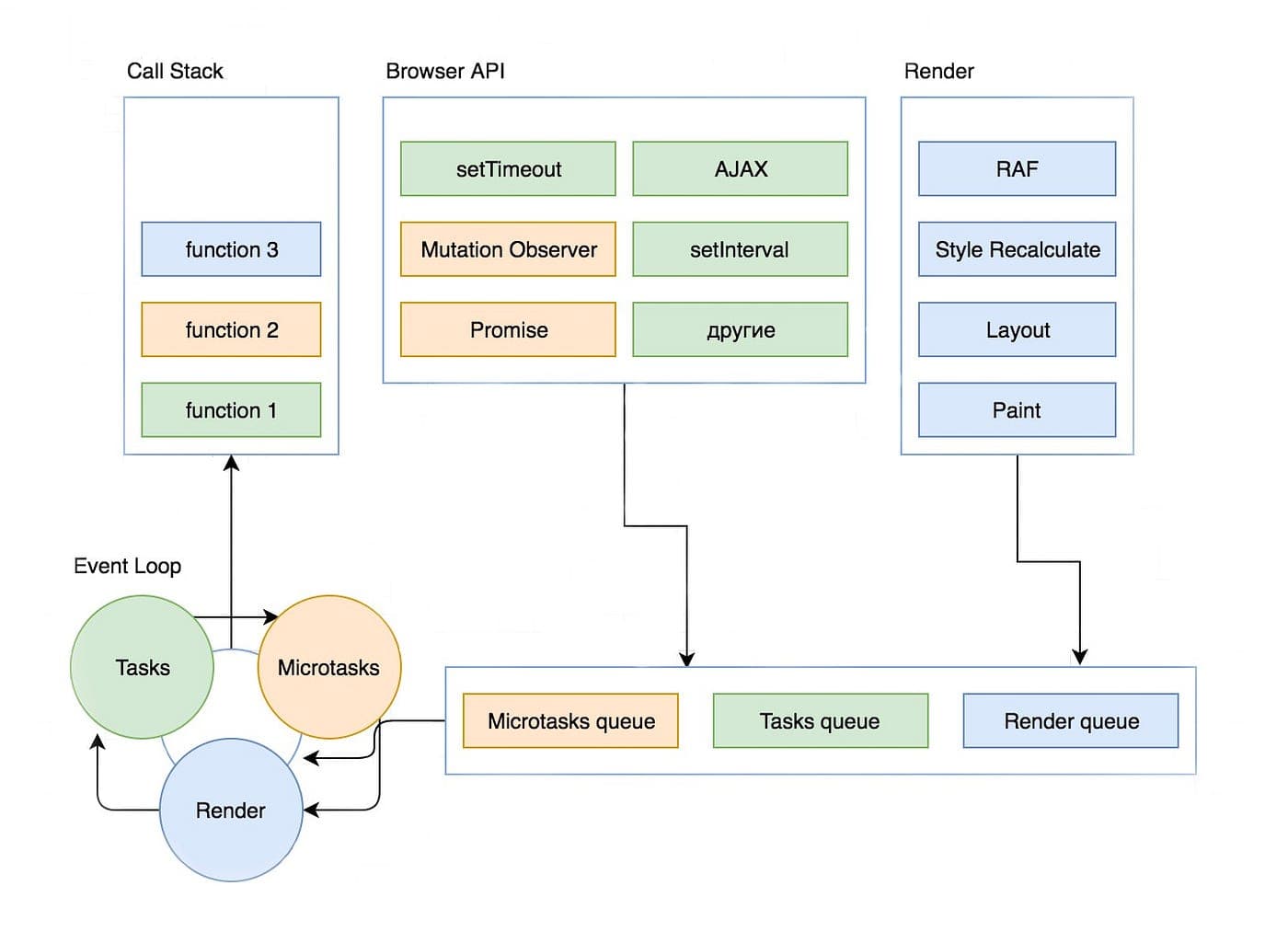 You can verify the flow with the following code:
js